其他輔助顯示層完善折線圖 | Python 數據可視化庫 Matplotlib 快速入門之十
多個座標系顯示-plt.subplots(面向對象的畫圖方法)
如果我們想要將上海和北京的天氣圖顯示在同一個圖的不同座標系當中,效果如下:
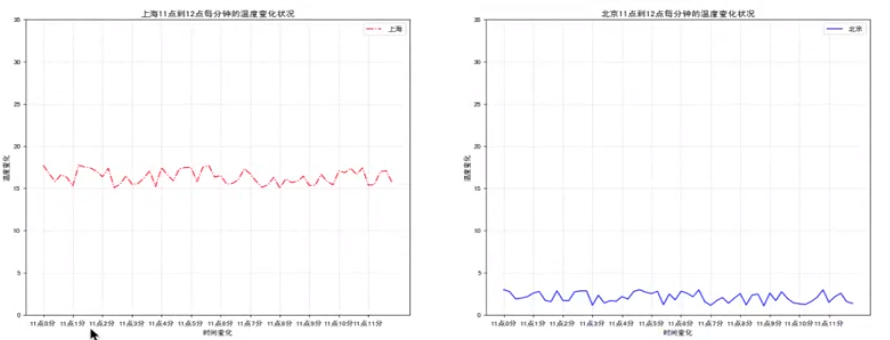
可以通過subplots函數實現(舊的版本中有subplot, 使用起來不方便), 推薦subplots函數。
- matplotlib.pyplot.subplots(nrows=1,ncols=1, **fig_kw) 創建一個帶有多個axes(座標系/繪圖區) 的圖
現在是1行2列,我們對代碼做出修改:
figure, axes = plt.subplots(nrows=1, ncols=2, **fig_kw)
axes[0].方法名()
axes[1].方法名()
Parameters:
nrows, ncols : int, optional, default: 1, Number of rows/coLumns of the subplot grid.
**fig_kw : All additional keyword arguments are passed to the figure() call.
Returns:
fig : 圖對象
ax :
設置標題等方法不同:
set_xticks
set_yticks
set_xlabel
set_ylabel關於axes子座標系的更多方法:參考https://matplotlib.org/api/axes_api.html#matplotlib.axes.Axes
- 注意:plt.函數名()相當於面向過程的畫圖方法,axes.set_方法名()相當於面向對象的畫圖方法。
我們來對此需求編寫代碼:
收集到上海當天的溫度變化情況,溫度在15度到18度
收集到北京當天的溫度變化情況,溫度在1度到3度
import random
# 1、準備數據 x,y
x = range(60)
y_shanghai  = [random.uniform(15, 18) for i in x]
y_beijing = [random.uniform(1, 3) for i in x]

# 2、創建畫布
figure, axes = plt.subplots(nrows=1, ncols=2, figsize=(20, 8), dpi=80)

# 3、繪製圖像
axes[0].plot(x, y_shanghai, color = "r", linestyle = "-.", label = "上海")
axes[1].plot(x, y_beijing, color = "b", label = "北京")

# 顯示圖例
axes[0].legend()
axes[1].legend()

# 修改x,y刻度
# 準備x的刻度說明
x_lable = ["11點{}分".format(i) for i in x]
axes[0].set_xticks(x[::5], x_lable[::5])
axes[0].set_yticks(range(0, 40, 5))
axes[1].set_xticks(x[::5], x_lable[::5])
axes[1].set_yticks(range(0, 40, 5))

# 添加網格顯示
axes[0].grid(True, linestyle = "--", alpha = 0.5)
axes[1].grid(True, linestyle = "--", alpha = 0.5)

# 添加描述信息
axes[0].set_xlable("時間變化")
axes[0].set_ylable("溫度變化")
axes[0].set_title("上海11點到12點每分鐘的溫度變化狀況")
axes[1].set_xlable("時間變化")
axes[1].set_ylable("溫度變化")
axes[1].set_title("北京11點到12點每分鐘的溫度變化狀況")
# 4、顯示圖
plt.show()
執行結果:
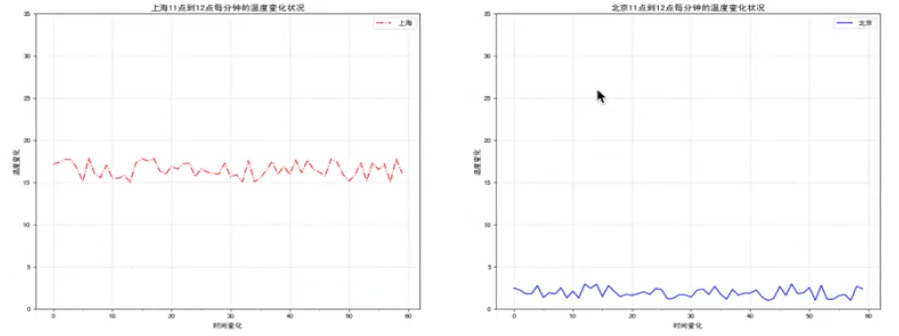
此時可以發現橫座標跟我們原本設置的不一致,此時是因為面向對象方法調用的問題,我們可以查詢上面的API文檔。
通過文檔查詢可以發現,set_xticks的第二個參數是bool值,所以我們需要修改,改為axes.set_xticklabels ,可以添加字符串。


修改代碼:
# 修改x,y刻度
# 準備x的刻度說明
x_lable = ["11點{}分".format(i) for i in x]
axes[0].set_xticks(x[::5])
axes[0].set_xticklabels(x_lable[::5])
axes[0].set_yticks(range(0, 40, 5))
axes[1].set_xticks(x[::5])
axes[1].set_xticklabels(x_lable[::5])
axes[1].set_yticks(range(0, 40, 5))
執行結果:
配套視頻課程,點擊這裡查看
獲取更多資源請訂閱Python學習站